一、官方文档
二、兼容版本
Theme OS 1.0, 2.0, 2.1
三、操作流程
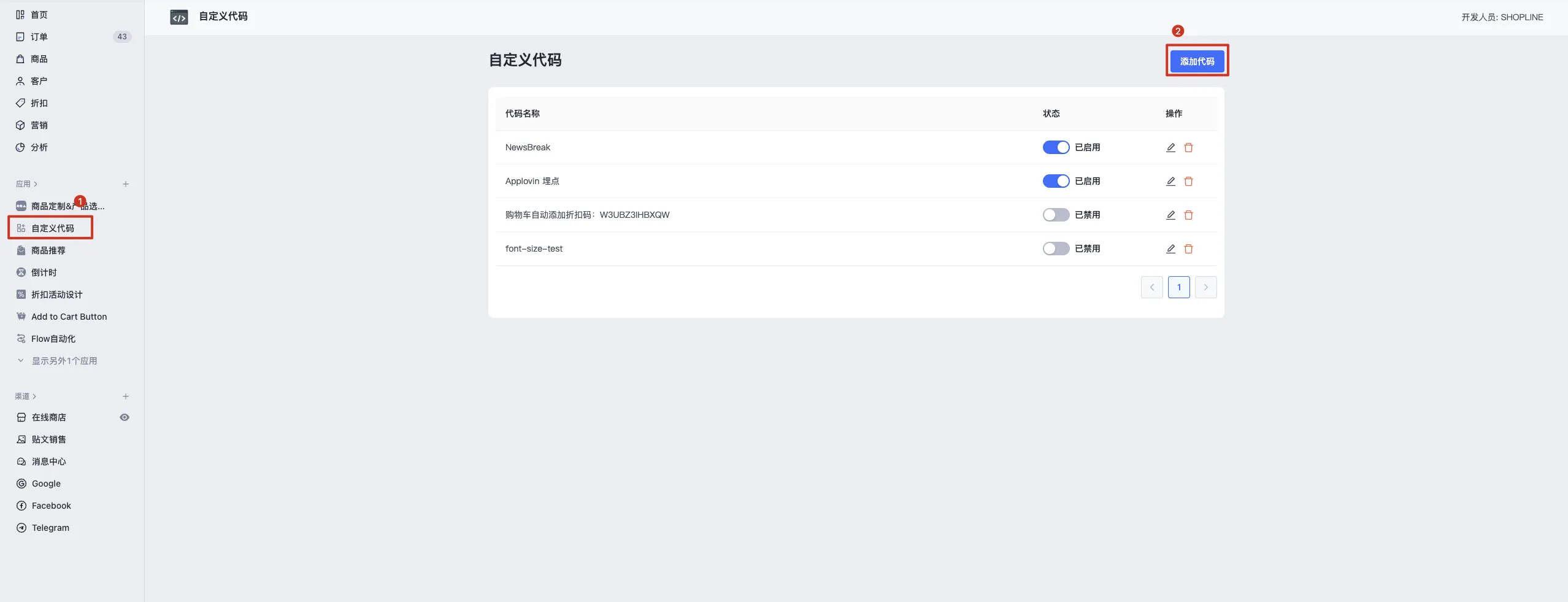
1. 安装自定义代码应用, 点击添加代码
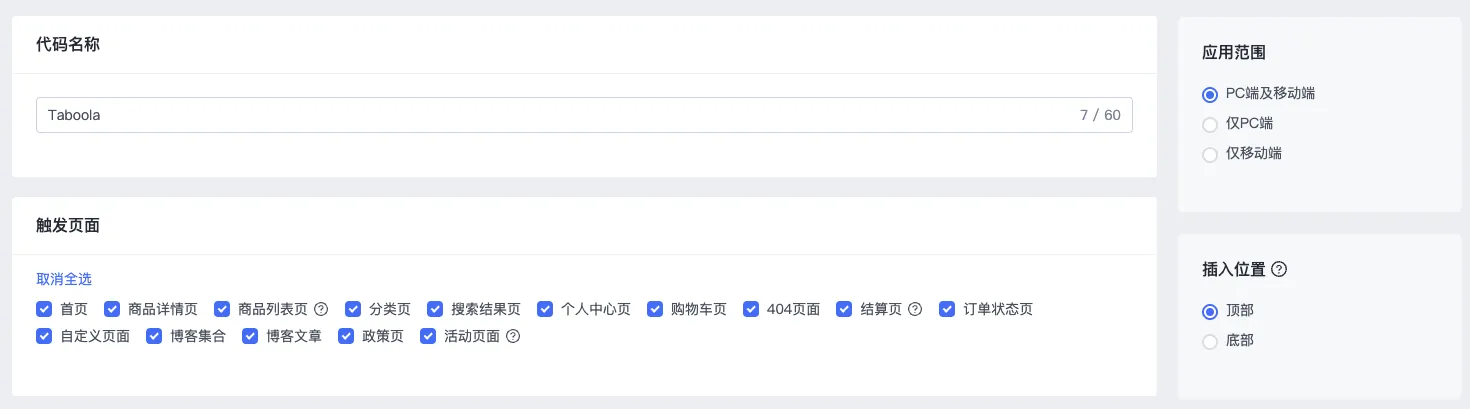
2. 触发页面全选,插入位置顶部
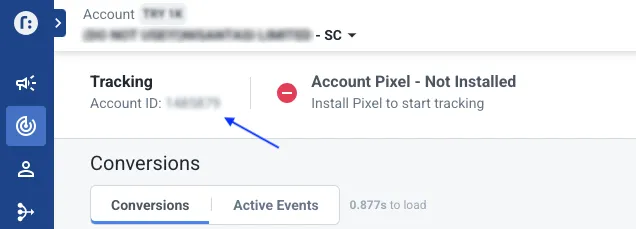
3. 将以下代码复制入代码内容, 请将所有YOUR_ACCOUNT_ID替换为您的 Account ID
当前支持事件:
-
page_view
-
add_to_cart
-
view_content
-
start_checkout
-
make_purchase
主题 2.1
<!-- Taboola Pixel Code -->
<script type="text/javascript">

  window._tfa = window._tfa || []; window._tfa.push({notify: 'event', name:
  'page_view', id: YOUR_ACCOUNT_ID}); !function (t, f, a, x) { if
  (!document.getElementById(x)) { t.async = 1;t.src =
  a;t.id=x;f.parentNode.insertBefore(t, f); }
  }(document.createElement('script'),
  document.getElementsByTagName('script')[0],
  '//cdn.taboola.com/libtrc/unip/YOUR_ACCOUNT_ID/tfa.js', 'tb_tfa_script');

  // add_to_cart
  (function() {
      const pushTaboolaEvent = () => {
          _tfa.push({notify: 'event', name: 'add_to_cart', id: YOUR_ACCOUNT_ID});
      };
      const originalFetch = window.fetch;
      window.fetch = function(...args) {
          return new Promise((resolve, reject) => {
              originalFetch.apply(this, args)
                  .then(response => {
                      const clone = response.clone();
                      if ((args[0] && args[0].url && args[0].url.includes("/cart/add")) || (args[0] && args[0] === "/cart/add")) {
                          clone.json().then(data => {
                              pushTaboolaEvent();
                          });
                      }

                      resolve(response);
                  })
                  .catch(error => {
                      reject(error);
                  });
          });
      };
      const originalSend = XMLHttpRequest.prototype.send;
      XMLHttpRequest.prototype.send = function(body) {
          const method = this._method;
          const url = this._url;
          if (method === 'POST' && url === '/leproxy/api/carts/cart/batch/add') {
              console.log('axon add_to_cart xhr');
              try {
                  const bodyData = JSON.parse(body);
                  pushTaboolaEvent();
              } catch (error) {
                  console.error("Error processing add_to_cart batch request", error);
              }
          }

          return originalSend.apply(this, arguments);
      };
  })();

  // view_content
  {{#if @root.product}}
    _tfa.push({notify: 'event', name: 'view_content', id: YOUR_ACCOUNT_ID});
  {{/if}}

  // start_checkout
  {{#if @root.checkout}}
    _tfa.push({notify: 'event', name: 'start_checkout', id: YOUR_ACCOUNT_ID});
  {{/if}}

  // make_purchase
  {{#if @root.thankyou}}
    _tfa.push({notify: 'event', name: 'make_purchase', id: YOUR_ACCOUNT_ID});
  {{/if}}
</script>
<!-- End of Taboola Pixel Code -->
主题 1.0&2.0
<!-- Taboola Pixel Code -->
<script type="text/javascript">

  window._tfa = window._tfa || []; window._tfa.push({notify: 'event', name:
  'page_view', id: YOUR_ACCOUNT_ID}); !function (t, f, a, x) { if
  (!document.getElementById(x)) { t.async = 1;t.src =
  a;t.id=x;f.parentNode.insertBefore(t, f); }
  }(document.createElement('script'),
  document.getElementsByTagName('script')[0],
  '//cdn.taboola.com/libtrc/unip/YOUR_ACCOUNT_ID/tfa.js', 'tb_tfa_script');

  // add_to_cart
  window.Shopline.event?.on('DataReport::AddToCart', function (payload) {
    _tfa.push({notify: 'event', name: 'add_to_cart', id: YOUR_ACCOUNT_ID});
  })

  // view_content
  {{#if @root.product}}
    _tfa.push({notify: 'event', name: 'view_content', id: YOUR_ACCOUNT_ID});
  {{/if}}

  // start_checkout
  {{#if @root.checkout}}
    _tfa.push({notify: 'event', name: 'start_checkout', id: YOUR_ACCOUNT_ID});
  {{/if}}

  // make_purchase
  {{#if @root.thankyou}}
    _tfa.push({notify: 'event', name: 'make_purchase', id: YOUR_ACCOUNT_ID});
  {{/if}}
</script>
<!-- End of Taboola Pixel Code -->