一、官方文档
二、兼容版本
主题1.0, 主题2.0, 主题2.1
三、操作流程
1. NewBreak配置
a. 创建你的 NewsBreak Pixel Event
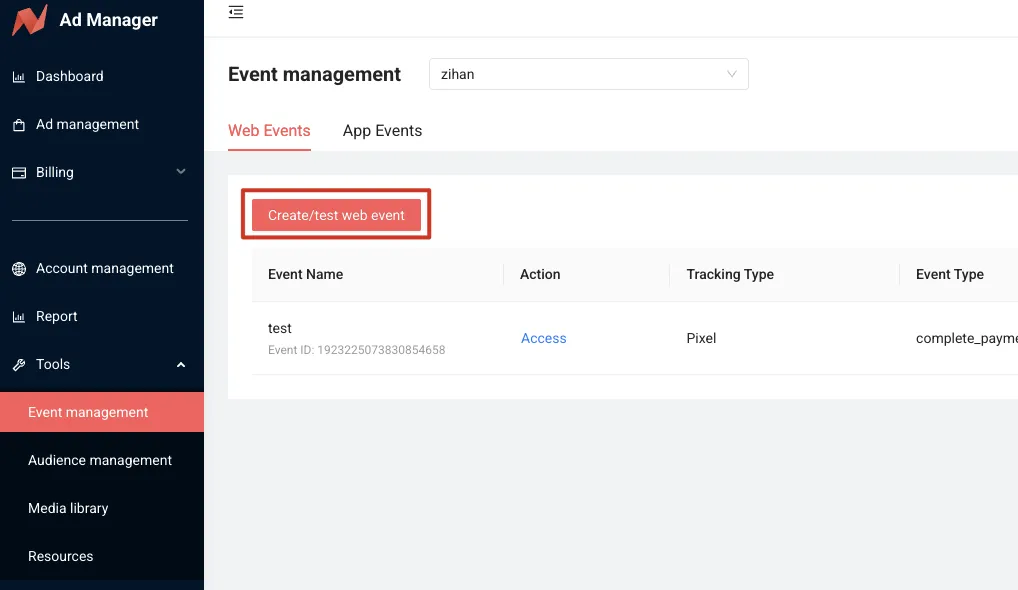
- 登录 Ad Manager ,然后导航到“Tools” > “Event Mangement” > “Create/test web event”。
b. 配置你的 NewsBreak Pixel Event
-
View Content
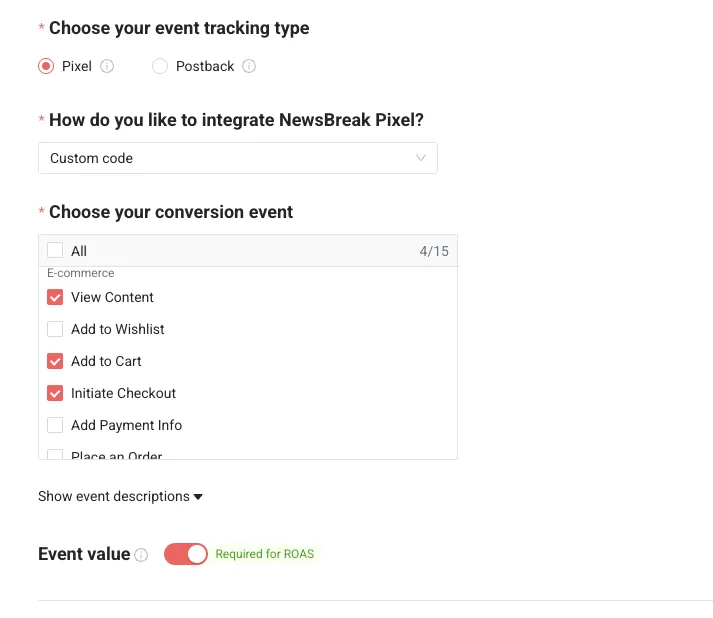
选择 Pixel 作为Tracking Type,Custom code作为集成方法,并指定您的事件类型为 View Content。 -
Add To Cart
选择 Pixel 作为Tracking Type,Custom code作为集成方法,并指定您的事件类型为 Add To Cart,同时开启 Event Value。 -
Initiate Checkout
选择 Pixel 作为Tracking Type,Custom code作为集成方法,并指定您的事件类型为 Initiate Checkout,同时开启 Event Value。 -
Complete Pyment
选择 Pixel 作为Tracking Type,Custom code作为集成方法,并指定您的事件类型为 Complete Payment,同时开启 Event Value。
c. 找到你的 NewsBreak Pixel ID
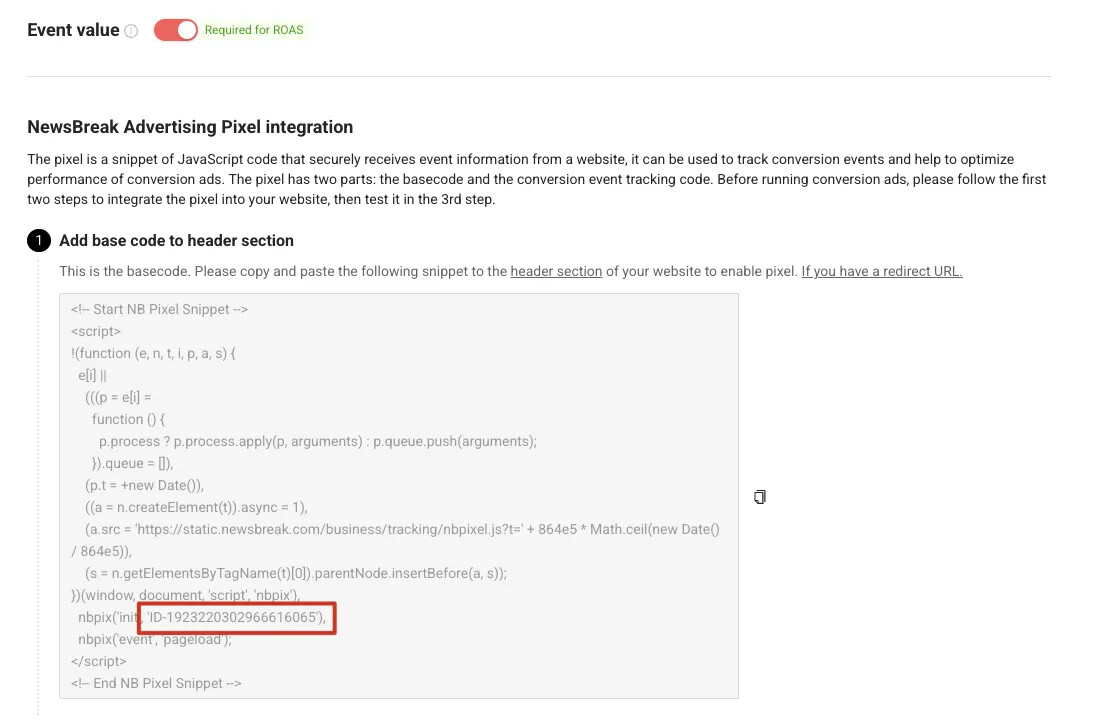
- 在下方 Base Code 中找到 NewsBreak Pixel ID
2. Shopline配置
a. 安装自定义代码应用, 点击添加代码
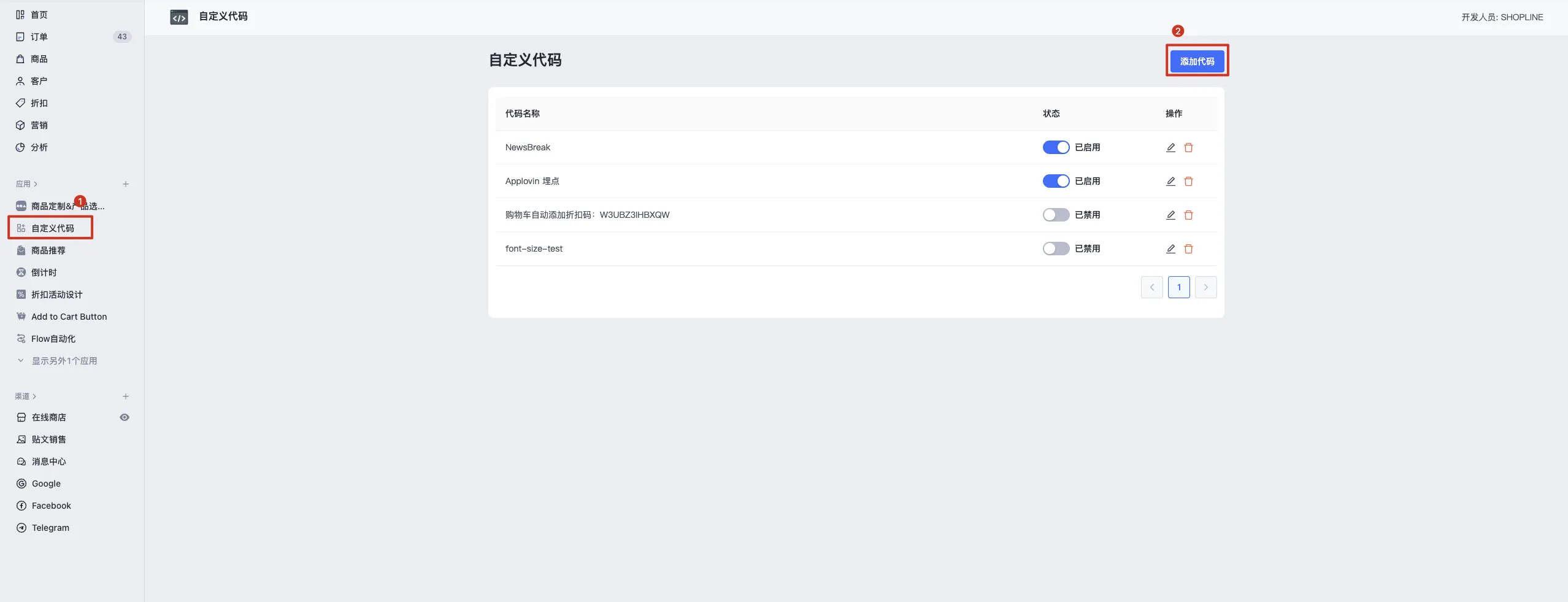
b. 触发页面全选,插入位置底部
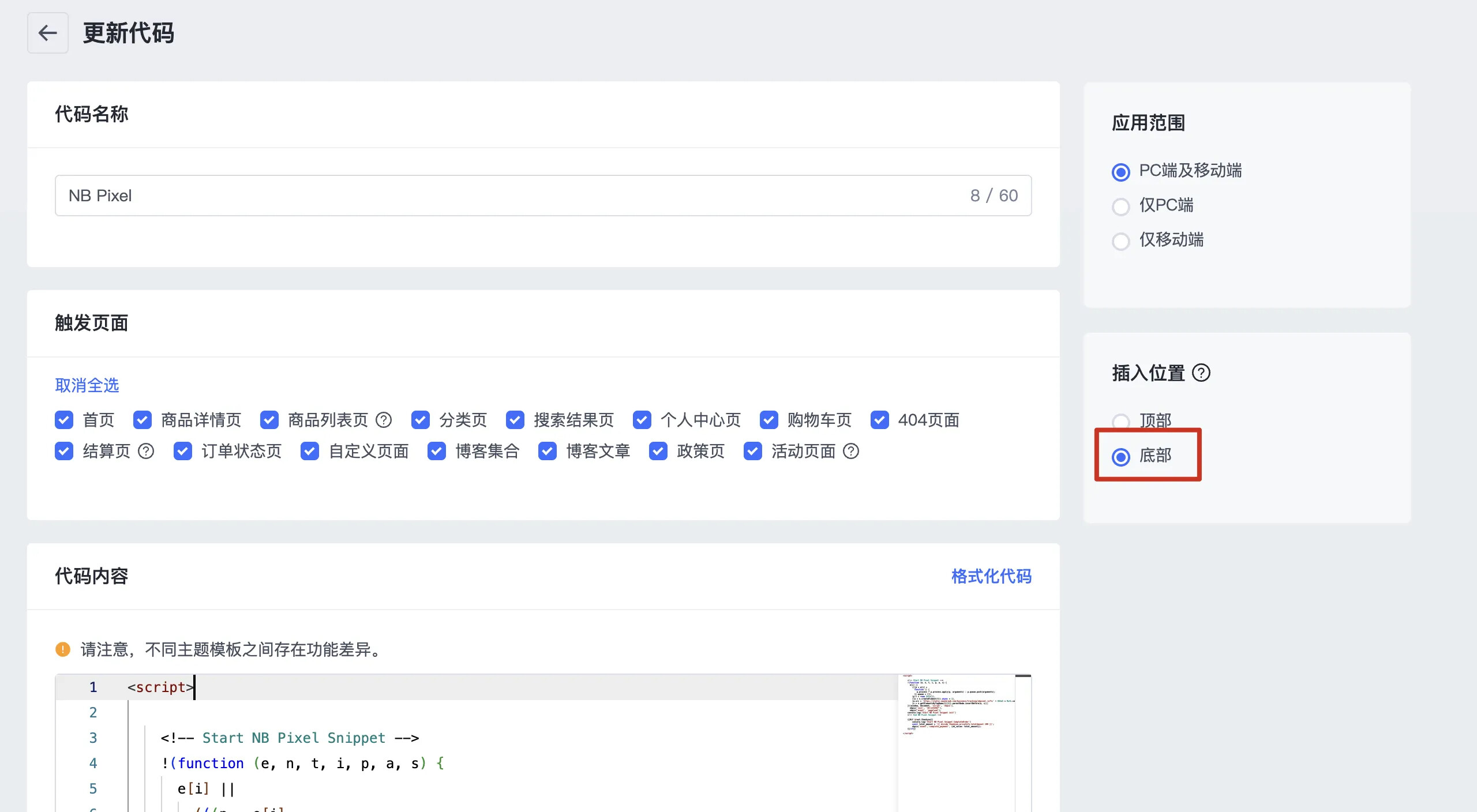
c. 将以下代码复制入代码内容, 注意修改自己的NewsBreak Pixel ID(nbpix(‘init’,‘ID-1234567890’),)即可
<script>
  <!-- Start NB Pixel Snippet -->
  !(function (e, n, t, i, p, a, s) {
    e[i] ||
      (((p = e[i] =
        function () {
          p.process ? p.process.apply(p, arguments) : p.queue.push(arguments);
        }).queue = []),
      (p.t = +new Date()),
      ((a = n.createElement(t)).async = 1),
      (a.src = 'https://static.newsbreak.com/business/tracking/nbpixel.js?t=' + 864e5 * Math.ceil(new Date() / 864e5)),
      (s = n.getElementsByTagName(t)[0]).parentNode.insertBefore(a, s));
  })(window, document, 'script', 'nbpix'),
    nbpix('init', 'ID-1234567890'),
    nbpix('event', 'pageload');
    console.log('Start NB Pixel Snippet init')
  <!-- End NB Pixel Snippet -->

  <!-- Start NB Pixel Snippet view_content -->
  // view_content
  {{#if @root.product}}
    console.log('Start NB Pixel Snippet view_content')
    const compare_at_price = '{{ divide product.selected_or_first_available_variant.compare_at_price 100 }}';
    nbpix('event','view_content', {nb_value: compare_at_price});
  {{/if}}
  <!-- End NB Pixel Snippet view_content -->

  <!-- Start NB Pixel Snippet add_to_cart -->
  !(function () {
    const originalFetch = window.fetch;
    window.fetch = function (...args) {
      return new Promise((resolve, reject) => {
        originalFetch
          .apply(this, args)
          .then((response) => {
            try {
              const clone = response.clone();
              if ((args[0] && args[0].url && args[0].url.includes("/cart/add")) || (args[0] && typeof(args[0])=='string' && args[0] === "/cart/add")) {
                clone.json().then((data) => {
                  console.log('Start NB Pixel Snippet add_to_cart')
                  if(data.final_price){
                    const add_to_cart_total_amount = data.final_price.toString();
                    nbpix('event','add_to_cart', {nb_value: add_to_cart_total_amount});
                  }else{
                    nbpix('event','add_to_cart');
                  }
                });
              }
              resolve(response);
            } catch (error) {
              console.error("Error processing add_to_cart batch request", error);
            }
          })
          .catch((error) => {
            reject(error);
          });
      });
    };
  })();
  <!-- End NB Pixel Snippet add_to_cart -->

  <!-- Start NB Pixel Snippet initiate_checkout -->
  {{#if @root.checkout}}
    console.log('Start NB Pixel Snippet initiate_checkout')
    const checkout_total_amount = '{{ divide checkout.total_price 100 }}';
    nbpix('event', 'initiate_checkout', {nb_value: checkout_total_amount});
  {{/if}}
  <!-- End NB Pixel Snippet initiate_checkout -->

  <!-- Start NB Pixel Snippet complete_payment -->
  {{#if @root.thankyou}}
    console.log('Start NB Pixel Snippet CompleteOrder')
    const thankyou_total_amount = '{{ divide thankyou.priceInfo.totalAmount 100 }}';
    nbpix('event','complete_payment', {nb_value: thankyou_total_amount});
  {{/if}}
  <!-- End NB Pixel Snippet complete_payment -->
</script>
<script>
  <!-- Start NB Pixel Snippet -->
  !(function (e, n, t, i, p, a, s) {
    e[i] ||
      (((p = e[i] =
        function () {
          p.process ? p.process.apply(p, arguments) : p.queue.push(arguments);
        }).queue = []),
      (p.t = +new Date()),
      ((a = n.createElement(t)).async = 1),
      (a.src = 'https://static.newsbreak.com/business/tracking/nbpixel.js?t=' + 864e5 * Math.ceil(new Date() / 864e5)),
      (s = n.getElementsByTagName(t)[0]).parentNode.insertBefore(a, s));
  })(window, document, 'script', 'nbpix'),
    nbpix('init', 'ID-1234567890'),
    nbpix('event', 'pageload');
    console.log('Start NB Pixel Snippet init')
  <!-- End NB Pixel Snippet -->

  <!-- Start NB Pixel Snippet view_content -->
    console.log('Start NB Pixel Snippet view_content')
    {{#if @root.product}}
      const compare_at_price = '{{ divide product.selected_or_first_available_variant.compare_at_price 100 }}';
      nbpix('event','view_content', {nb_value: compare_at_price});
    {{/if}}
  <!-- End NB Pixel Snippet view_content -->

  <!-- Start NB Pixel Snippet add_to_cart -->
    window.Shopline.event?.on('DataReport::AddToCart', function (payload) {
      const { data } = payload;
      nbpix('event', 'add_to_cart', {nb_value: data.price});
    })
  <!-- End NB Pixel Snippet add_to_cart -->

  <!-- Start NB Pixel Snippet initiate_checkout -->
  {{#if @root.checkout}}
    console.log('Start NB Pixel Snippet initiate_checkout')
    const checkout_total_amount = '{{ divide checkout.total_price 100 }}';
    nbpix('event', 'initiate_checkout', {nb_value: checkout_total_amount});
  {{/if}}
  <!-- End NB Pixel Snippet initiate_checkout -->

  <!-- Start NB Pixel Snippet complete_payment -->
  {{#if @root.thankyou}}
    console.log('Start NB Pixel Snippet CompleteOrder')
    const thankyou_total_amount = '{{ divide thankyou.priceInfo.totalAmount 100 }}';
    nbpix('event','complete_payment', {nb_value: thankyou_total_amount});
  {{/if}}
  <!-- End NB Pixel Snippet complete_payment -->
</script>