一、官方文档
https://developers.axon.ai/zh/
https://developers.axon.ai/zh/ecommerce/events-and-objects/#category-ids
二、兼容版本
主题 3.0
三、操作流程
准备:安装自定义代码应用,以下操作需要添加自定义代码
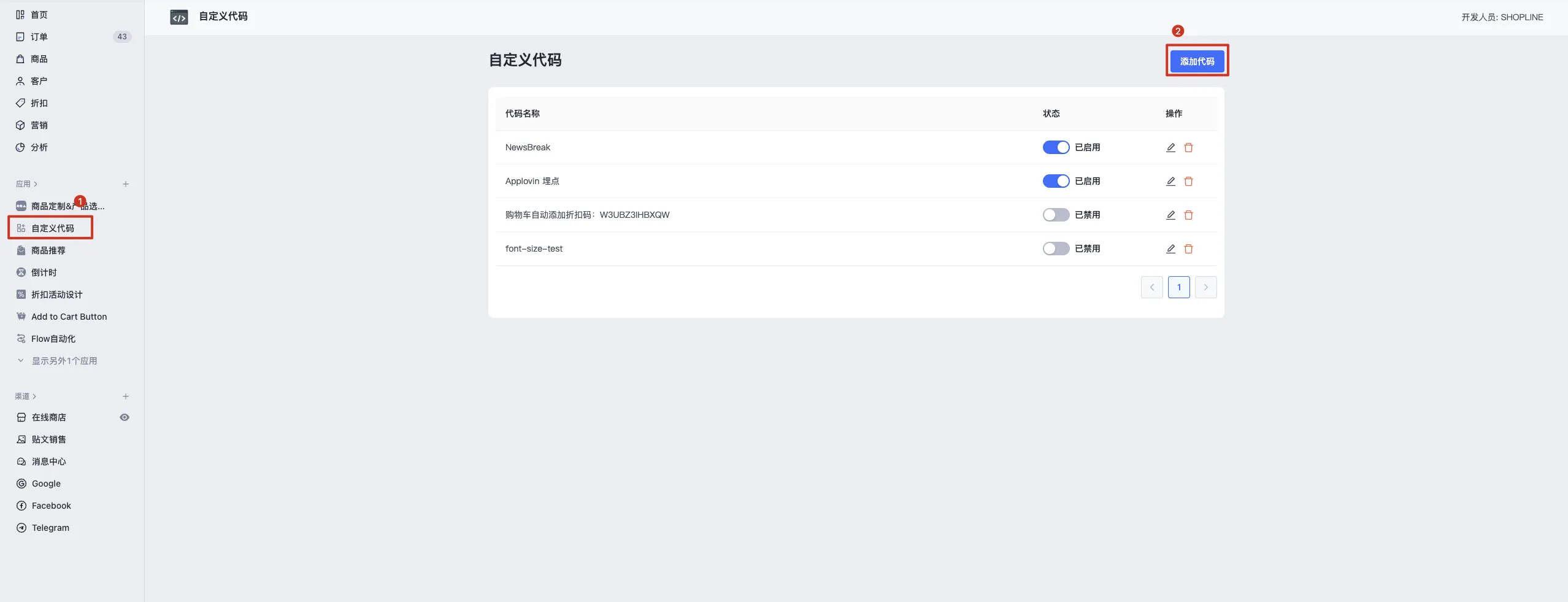
注意:
-
代码中 AXON_EVENT_KEY 部分中填入自己的ID
-
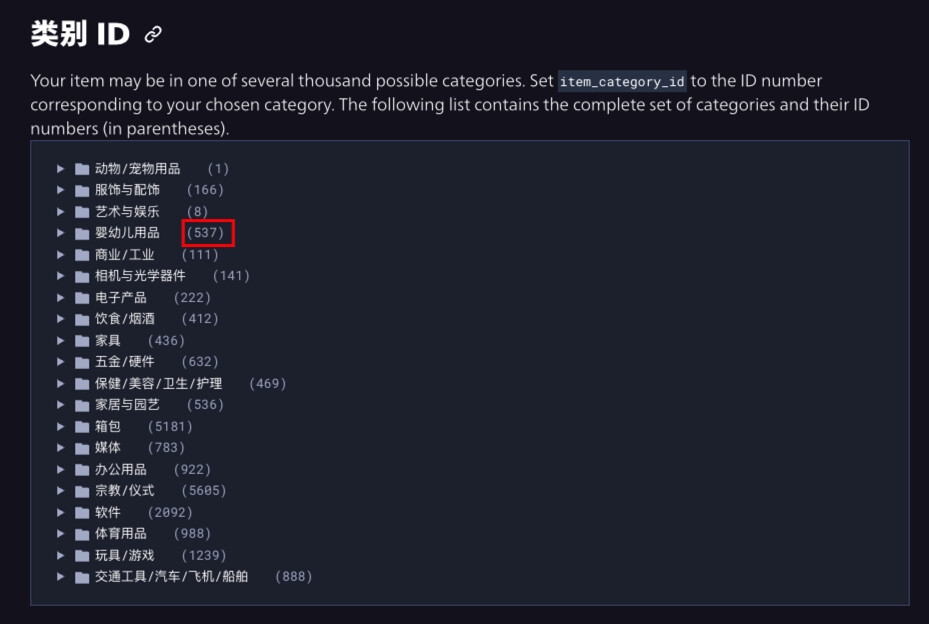
分类ID,去下面网址找,覆盖代码中 166 的部分(166默认是服饰与饰品),比如:婴幼儿用品,就用 537 替换掉 166
https://developers.applovin.com/zh/ecommerce/events-and-objects/#category-ids
1. 通用代码安装
1.1. 添加代码,触发页面全选,插入位置顶部,语法选择 Sline
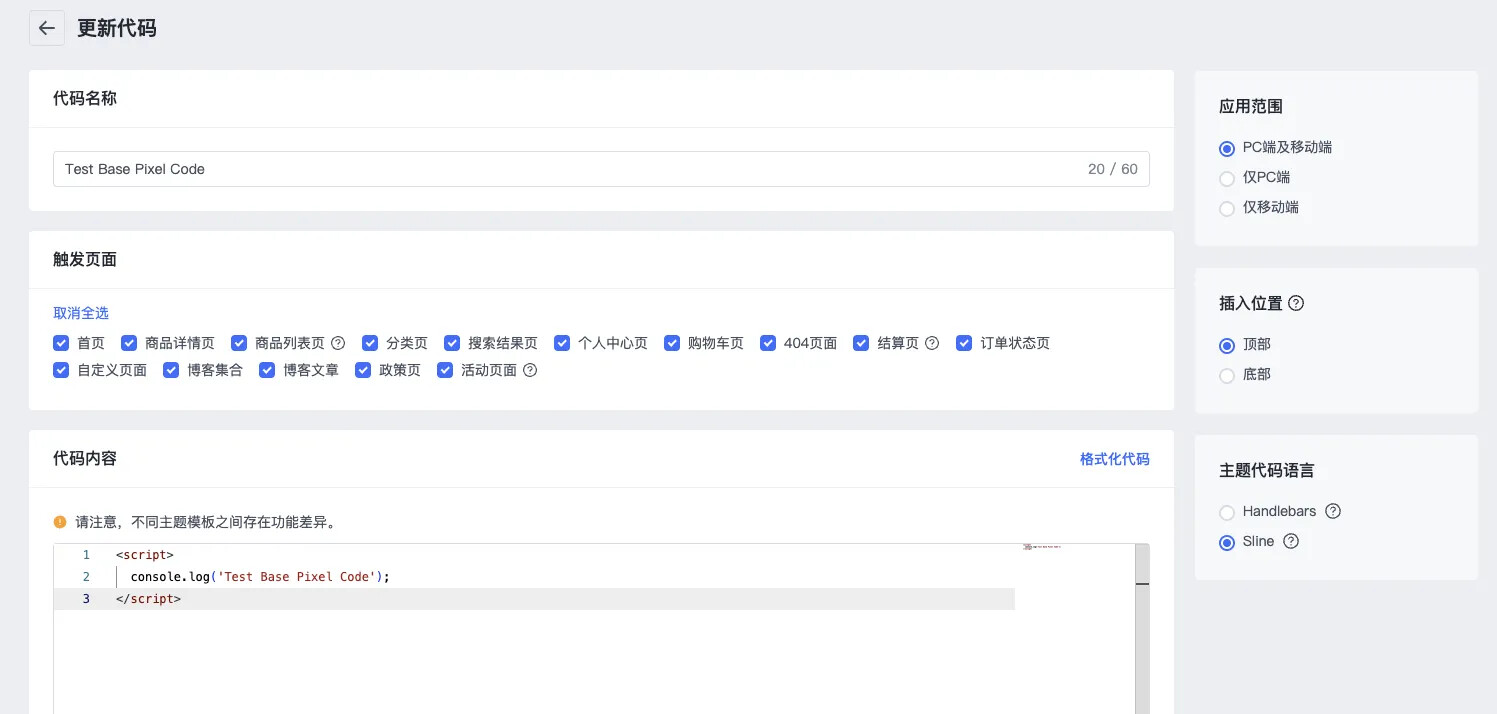
1.2. 将以下代码复制入代码内容,将 «your-event-key» 替换为您的 AppLovin 账户 中的 key。
<script>
  var AXON_EVENT_KEY="«your-event-key»";
  !function(e,r){var t=["https://s.axon.ai/pixel.js","https://res4.applovin.com/p/l/loader.iife.js"];if(!e.axon){var a=e.axon=function(){a.performOperation?a.performOperation.apply(a,arguments):a.operationQueue.push(arguments)};a.operationQueue=[],a.ts=Date.now(),a.eventKey=AXON_EVENT_KEY;for(var n=r.getElementsByTagName("script")[0],o=0;o<t.length;o++){var i=r.createElement("script");i.async=!0,i.src=t[o],n.parentNode.insertBefore(i,n)}}}(window,document);
  axon("init");
  axon("track", 'page_view');
</script>
2. 加购事件
2.1. 添加代码,触发页面全选,插入位置顶部,语法选择 Sline
如果对应页面不会存在加购操作,可以不选。
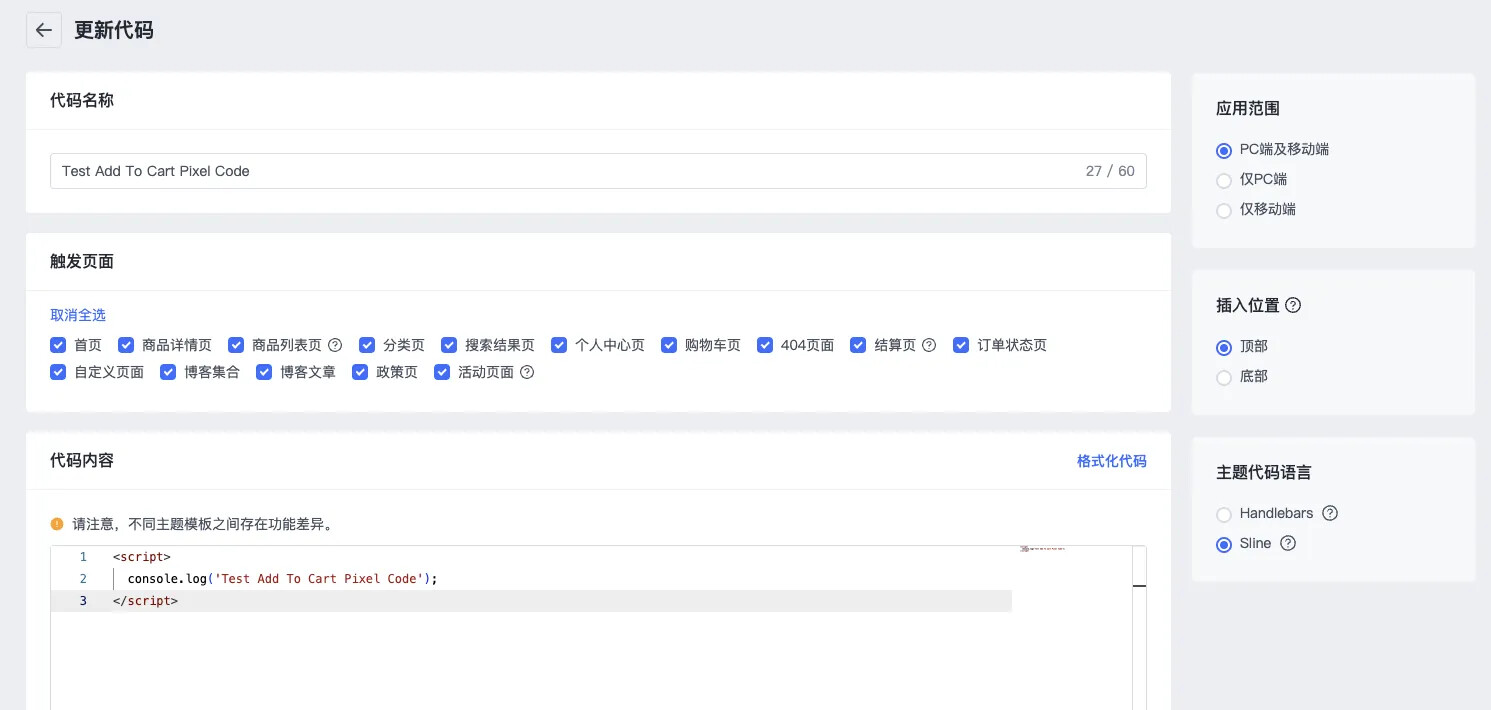
2.2. 将以下代码复制入代码内容
<script>
  var item_category_id = 166;
  (function() {
      const originalFetch = window.fetch;
      window.fetch = function(...args) {
          return new Promise((resolve, reject) => {
              originalFetch.apply(this, args)
                  .then(response => {
                      const clone = response.clone();
                      if (((args[0] && args[0].url && args[0].url.includes("/cart/add")) || (args[0] && args[0] === "/cart/add")) &&(!args[0].url || !args[0].url.includes("_xcotton"))) {
                          clone.json().then(data => {
                              console.log('axon add_to_cart fetch');
                              axon("track", "add_to_cart", {
                                  "currency": window.Shopline.currency,
                                  "items": [
                                      {
                                          "item_id": data.product_id,
                                          "item_name": data.product_title,
                                          "price": data.price,
                                          "quantity": data.quantity,
                                          "item_variant_id": data.variant_id,
                                          "image_url": data.image,
                                          "item_category_id": item_category_id
                                      }
                                  ]
                              });
                          });
                      }
                      resolve(response);
                  })
                  .catch(error => {
                      reject(error);
                  });
          });
      };
  })();
</script>
3. 商品访问事件
3.1. 添加代码,触发页面选择商品详情页,插入位置底部,语法选择 Sline
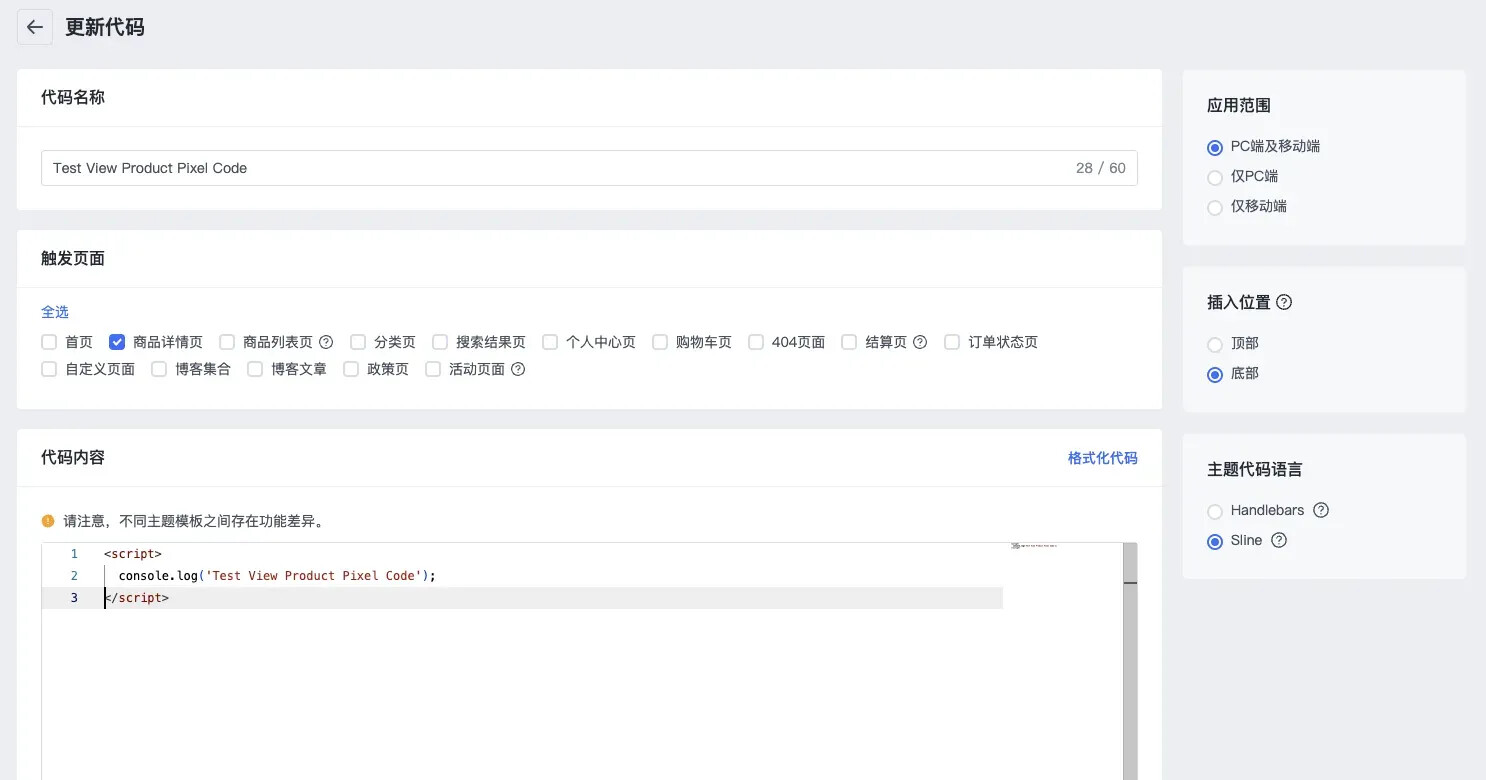
3.2. 将以下代码复制入代码内容
<script>
  var item_category_id = 166;
  axon("track", "view_item", {
      "currency": window.Shopline.currency,
      "items": [
          {
              "item_id": "{{product.id}}",
              "item_name": "{{product.title}}",
              "price": {{ product.first_available_variant.price | divided_by(100.00) }},
              "quantity": 1,
              "item_variant_id": "{{ product.first_available_variant.id }}",
              "image_url": "{{ product.featured_image.src }}",
              "item_category_id": item_category_id
          }
      ]
  });
</script>
4. 开始结账与下单成功事件
4.1. 添加代码,触发页面选择结算页,插入位置底部,语法选择 Handlebars
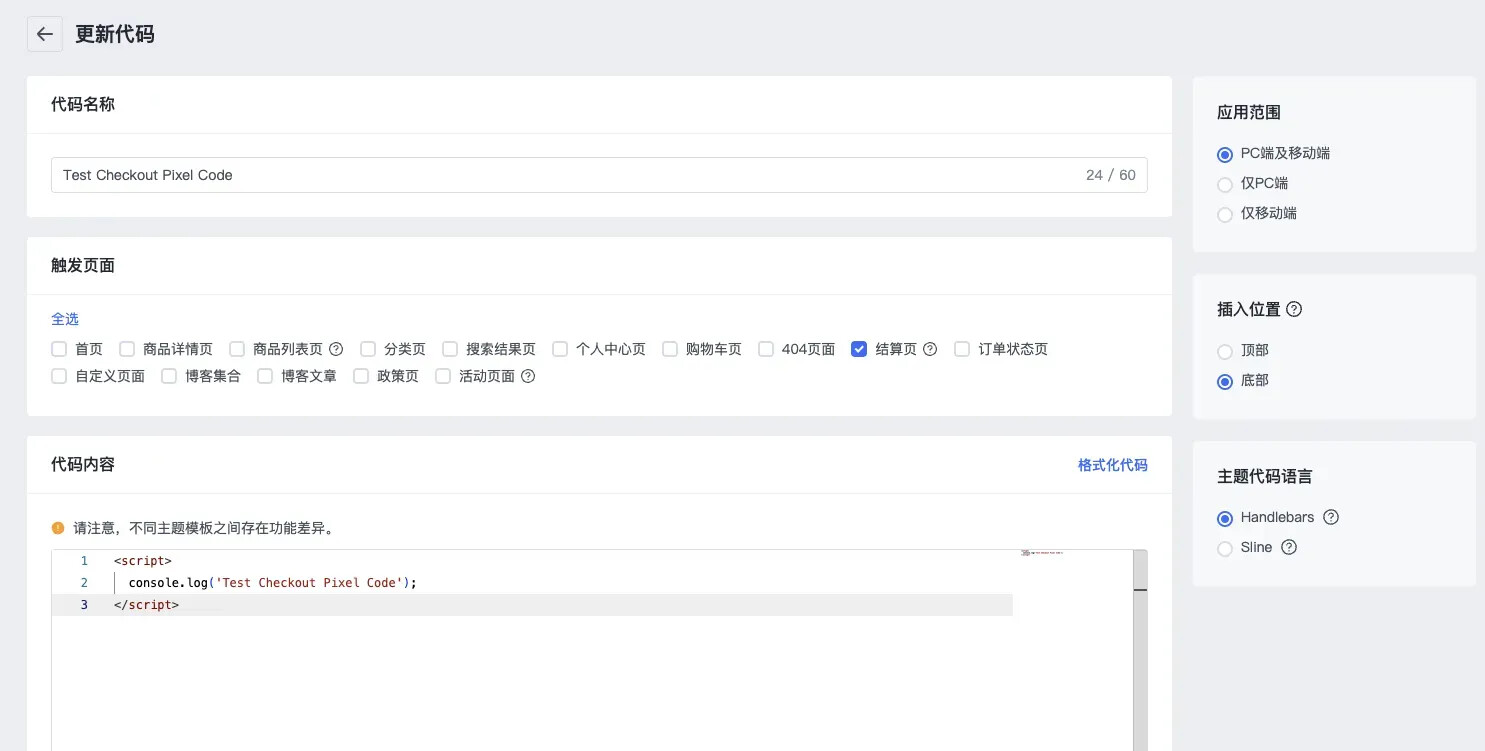
4.2. 将以下代码复制入代码内容
<script>
  var item_category_id = 166;
  {{#if @root.checkout}}
    axon("track", "begin_checkout",{
        "currency": window.Shopline.currency,
        "value": {{ divide checkout.total_price 100 }},
        "items": [
                    {{#each checkout.productInfos }}
                        {
                            item_id: "{{ productSeq }}",
                            item_name: "{{ productName }}",
                            item_variant_id: "{{ productSku }}",
                            price: {{ divide finalPrice 100 }},
                            quantity: {{ productNum }},
                            image_url: "{{ productImage }}",
                            item_category_id: item_category_id
                        },
                    {{/each}}
                ]
    })
  {{/if}}

  {{#if @root.thankyou}}
    {{ assign 'total_product_amount' (minus thankyou.priceInfo.totalAmount thankyou.priceInfo.expressAmount) }}
    axon("track", "purchase", {
        "currency": window.Shopline.currency,
        "value": {{ divide total_product_amount 100 }},
        "transaction_id": "{{ thankyou.basicInfo.appOrderSeq }}",
        "user_id": "{{ thankyou.buyerInfo.buyerId }}",
        "shipping": {{ divide thankyou.priceInfo.expressAmount 100 }},
        "tax": {{ divide thankyou.priceInfo.taxAmount 100 }},
        "items": [
            {{#each thankyou.orderItemList }}
                {
                    item_id: "{{ productSeq }}",
                    item_name: "{{ productName }}",
                    item_variant_id: "{{ productSku }}",
                    price: {{ divide finalPrice 100 }},
                    quantity: {{ productNum }},
                    image_url: "{{ productImage }}",
                    item_category_id: item_category_id
                },
            {{/each}}
        ]
    });
  {{/if}}
</script>